
Theodore Lowe, Ap #867-859
Sit Rd, Azusa New York
Find us here
Clipping Path Essentials: Unlocking Its Versatile Uses
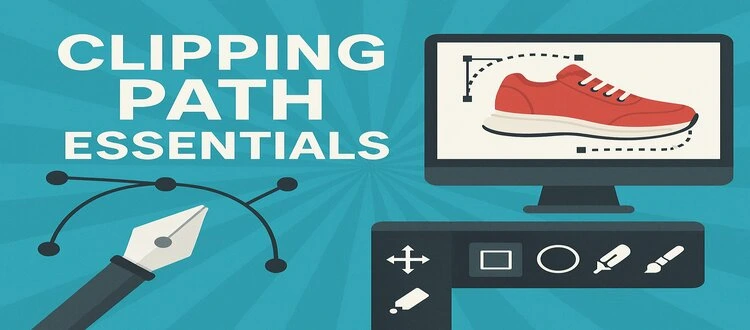
That's exactly what the clipping path can do for you. Whether you're a budding photographer, a seasoned graphic designer, or a savvy e-commerce entrepreneur, mastering the art of clipping paths can revolutionize how you present your images. But what exactly is a clipping path, and why should you care?
This guide is here to unravel the mystery and showcase the many ways this tool can elevate your work. Dive in to discover how you can harness the full potential of clipping paths and make your visuals stand out. Trust us, you won't want to miss out on these game-changing applications.
What Is Clipping Path?
Clipping path is a crucial tool in image editing. It helps remove backgrounds or isolate parts of a picture. This technique is essential for many industries. From e-commerce to graphic design, clipping paths are widely used.
What Is A Clipping Path?
A clipping path is a closed vector path. It is used to cut out objects from a picture. Imagine drawing a line around an object. This path tells software what to keep and what to discard. It's a precise way to isolate elements.
How Clipping Paths Work
Software tools create clipping paths. The path is drawn around the desired area. Once complete, everything outside the path is removed. Only the selected part remains. This process ensures clean edges and a professional look.
Tools Used For Clipping Paths
Graphic design software like Adobe Photoshop is popular for clipping paths. Users employ the pen tool to draw paths. This tool allows for accuracy and control. Other software offers similar features. Choose based on your needs and expertise.
Importance Of Clipping Paths
Clipping paths enhance image quality. They provide clear and focused visuals. Businesses use them to showcase products. Designers use them for creative projects. Their importance spans across various fields.
Key Tools And Techniques
Discover essential tools and techniques for mastering clipping path applications. Explore Photoshop’s pen tool for precise cutouts and layer masks for seamless edits. These methods ensure clean, professional results in image editing.
Clipping path is a fundamental technique in the world of image editing, especially for professionals dealing with product photography, advertising, and graphic design. Understanding the key tools and techniques involved can elevate your skills and enhance the quality of your work. Whether you're a seasoned designer or a beginner, mastering these essentials will open new doors in your creative process. Let's dive into the specifics of what you need to know.
Understanding The Basics: Pen Tool Mastery
The Pen Tool in Adobe Photoshop is your best friend when creating clipping paths. It's precise and versatile, allowing you to draw paths around objects with exceptional accuracy. Practice drawing simple shapes and gradually move to more complex objects. You'll soon find that the more you use it, the better your control becomes. Have you ever wondered why some images look so crisp and clean? It's often because of an expertly crafted clipping path using the Pen Tool.
Layer Masks: A Powerful Ally
Layer Masks provide a non-destructive way to hide parts of an image. This means you can edit without losing original data, offering flexibility in your design process. Imagine you want to isolate a product against a different background. Layer Masks let you do this seamlessly, maintaining the original image for future tweaks. Try experimenting with different brush sizes and opacities on Layer Masks. It’s surprising how much control you have over the finer details.
Refine Edge For Perfect Results
Refine Edge is an essential technique for ensuring your clipping paths look natural, especially when dealing with complex edges like hair or fur. Do your images have a halo effect or jagged edges? Use Refine Edge to smooth out these imperfections and achieve a polished finish. What challenges do you face with clipping paths? If it's those tricky edges, Refine Edge can be your solution.
Using The Magic Wand Tool
The Magic Wand Tool is perfect for selecting areas of an image with similar colors. It can speed up the clipping path process when working with simple backgrounds. Set the tolerance level to get just the right selection. Too high, and you might select too much. Too low, and you'll miss essential parts. How often do you wish for a quicker way to select areas? The Magic Wand Tool might just be your shortcut to efficiency.
Feathering Edges: Softening Your Selection
Feathering edges is a technique that softens the transition between the selected area and the background. This results in a more natural look. Adjust the feather radius to suit your image's needs. A slight adjustment can make a significant difference in how the clipping path blends. Have you tried feathering before? It's an underrated tool that can significantly enhance the realism of your edits.
Practical Application: Combining Tools For Best Results
Combining these tools and techniques can lead to impressive results. The key is knowing when to use each tool and how they complement each other. For instance, start with the Pen Tool for precision, use Layer Masks for flexibility, and finish with Refine Edge for detail perfection. What’s your go-to strategy when creating clipping paths? Mixing these tools might give you a new perspective on achieving the best results. Incorporating these key tools and techniques into your workflow can significantly improve your image editing capabilities. As you continue to practice and explore, you'll find that each tool offers unique benefits that can help you achieve your creative vision.
Applications In E-commerce
Clipping paths improve e-commerce images by highlighting products, removing backgrounds, and ensuring clean, professional visuals. This technique enhances product presentation, making images attractive and boosting sales potential. Effective use of clipping paths in e-commerce can significantly enhance customer experience and increase conversion rates.
In the bustling world of e-commerce, product presentation is everything. The way a product is showcased can be the deciding factor in a customer's buying decision. This is where the magic of clipping paths comes into play. By isolating products from their backgrounds, clipping paths enhance the visual appeal of product images, ensuring they catch the eye. But what are the specific applications of clipping paths in e-commerce? Let’s dive into some key uses.
Enhancing Product Images
The first impression counts. A crisp, clean product image can make all the difference in a crowded marketplace. Clipping paths allow you to remove distracting backgrounds, drawing attention directly to the product. Imagine browsing through an online store filled with cluttered backgrounds. Wouldn't you prefer a streamlined image that lets the product shine? By enhancing product images with clipping paths, you ensure that potential buyers focus on the item, not the noise around it.
Creating Consistent Catalogs
Consistency breeds trust. When your product catalog looks cohesive, it reflects professionalism and reliability. Clipping paths help you maintain uniformity across all product images, regardless of the original background or setting. Think about your favorite online store. Chances are, their product images have a consistent look and feel. This isn't a coincidence. By using clipping paths, you can create catalogs where each image aligns perfectly, making the shopping experience smoother for your customers. Have you ever thought about how consistency in product images might affect your sales? It's worth considering. A consistent catalog not only enhances your brand’s image but also makes it easier for customers to navigate and decide.
Role In Graphic Design
Clipping path is a cornerstone in graphic design. It enables precise image editing, ensuring clean outlines and accurate shapes. Designers rely on it to isolate parts of an image for detailed work. This enhances creativity and efficiency in digital art projects.
Crafting Creative Layouts
Clipping paths help designers to create unique layouts. By isolating images, they can position elements precisely. This control allows them to craft visually appealing designs. It offers flexibility in arranging text and images. Designers can experiment with various compositions. The result is an engaging and dynamic visual story.
Developing Brand Identity
Brand identity is vital for businesses. Clipping paths aid in creating consistent imagery. This consistency strengthens brand recognition. Designers use clipping paths to maintain uniformity in logos and product images. It helps in producing clean, professional visuals. These visuals are crucial for marketing materials. A strong brand image builds trust with customers. Clipping paths ensure each element aligns with the brand's theme.
Importance In Photography
Photography captures moments and tells stories. Clipping paths transform these images. They are essential for various photography applications. They enhance image quality and focus on the main subject. Clipping paths are indispensable in photography.
Background Removal
Background removal is a common use of clipping paths. It isolates the subject from its background. This technique highlights the main object. It is crucial for product photography. Clean backgrounds improve focus and visual appeal. They ensure viewers concentrate on the product. Clipping paths provide precision in background removal.
Image Retouching
Image retouching refines photographs. Clipping paths play a key role. They allow detailed editing of specific areas. This improves photo quality and aesthetics. Retouching removes imperfections. It enhances colors and textures. Clipping paths make retouching efficient and accurate. They give photographers control over final images.
Clipping Path For Marketing
Explore the essentials of clipping path techniques in marketing. Enhance images by removing backgrounds for a polished look. This guide reveals versatile applications, transforming visuals for impactful brand promotion.
Clipping Path for Marketing In the fast-paced world of digital marketing, standing out visually is crucial. Clipping path techniques can be your secret weapon for creating eye-catching visuals that captivate your audience. Whether you're a small business owner or part of a marketing team, understanding how to harness the power of clipping paths can elevate your marketing efforts.
Optimizing Visual Content
Visual content is often the first thing your audience sees. It's your chance to make a lasting impression. With clipping paths, you can refine images by removing backgrounds, highlighting specific parts, or even combining elements from different images seamlessly. This precision allows you to present your products or services in a polished manner. Think about how you feel when you see a cluttered image versus a clean, focused one. Clipping paths help you achieve that clean look. By optimizing your images, you ensure that your audience sees exactly what you want them to see. This clarity can significantly boost engagement and improve how your brand is perceived. Is there a particular product you want to showcase prominently? A well-applied clipping path can draw attention to your product, making it the star of the show. When your audience can clearly see what you're offering, they're more likely to take action.
Creating Engaging Advertisements
Advertisements are the backbone of marketing strategies. They need to be compelling enough to grab attention in a split second. Clipping paths are instrumental in crafting advertisements that pop. They allow you to manipulate images to fit the narrative of your ad perfectly. Consider the difference between a generic ad and one that's tailored specifically to your message. By using clipping paths, you can alter images to resonate more with your audience. This customization not only makes your ads more engaging but also enhances their effectiveness. Have you ever noticed how certain ads seem to speak directly to you? It's not just the text; it's the visuals that connect. Clipping paths give you the control to craft those visuals. You can create advertisements that are not just seen but remembered. In marketing, every detail counts. When your visuals are optimized and engaging, your message is amplified. Clipping paths offer you the tools to ensure your marketing is not just heard but felt. Are you ready to elevate your marketing game with clipping paths?
Challenges And Solutions
Navigating clipping path challenges involves handling complex curves and intricate details. Solutions like advanced software tools and skilled professionals enhance accuracy. Efficient techniques ensure high-quality results across diverse applications, from e-commerce to graphic design.
Navigating the world of clipping paths can be both rewarding and challenging. Whether you're a seasoned graphic designer or just starting out, understanding the difficulties that arise and knowing how to tackle them is crucial. Let's dive into some common challenges you might face and practical solutions that can make your work smoother and more efficient.
Handling Complex Images
Working with intricate images can be daunting. You might encounter hair, fur, or detailed patterns that demand meticulous attention. These elements require precision to ensure the final image looks natural. Imagine working on a product shoot where the model's hair blends seamlessly into the background. The challenge is isolating the hair without losing its natural texture. One practical approach is using advanced tools like the pen tool to outline these complex areas. Zoom in to refine the edges, ensuring every strand is captured. Have you ever tried using automated tools and found the result lacking? Sometimes, manual adjustments are necessary. This might seem tedious, but the outcome is worth it. By dedicating extra time to these details, the final image will stand out with clarity and precision.
Ensuring Quality And Precision
Quality control is non-negotiable in clipping path projects. Errors can compromise the entire project, affecting your reputation and client satisfaction. Precision ensures the outcome meets professional standards. Start by setting quality benchmarks before beginning the clipping path process. Are you checking each image after editing? A simple technique involves reviewing images at different zoom levels. This helps spot errors that might be missed at a standard view. Consider collaborating with peers or using feedback loops. Fresh eyes can catch mistakes you've overlooked. By incorporating regular reviews, you maintain high standards and improve your skills. What's your strategy for ensuring precision? By adopting these solutions, the challenges of complex images and quality control can be transformed into opportunities for excellence. The key is patience and practice, leading to consistently outstanding results.
Future Trends
Clipping path essentials offer diverse applications in design and photography. These techniques enhance images by removing backgrounds, creating clean and professional visuals. With increasing digital content, understanding these tools is vital for precise image editing, ensuring standout visuals across various platforms.
In the ever-evolving world of digital imaging, the future of clipping path techniques holds exciting possibilities. As technology advances, so do the methods and applications of these essential photo editing tools. Whether you're a graphic designer, photographer, or business owner, staying ahead of these trends can give you a competitive edge. Let's explore the future trends in clipping path applications and what they mean for you.
1. Automation And Ai Integration
Automation is reshaping industries, and clipping paths are no exception. With AI-powered tools, creating precise clipping paths can become faster and more efficient. Imagine reducing hours of manual work into just a few clicks. This will not only save time but also enhance productivity, allowing you to focus on more creative aspects of your projects.
2. Enhanced Accuracy With Machine Learning
Machine learning is continuously improving the accuracy of clipping path techniques. Advanced algorithms can now detect and adapt to intricate details of an image. This means fewer mistakes and more precise edits. As these technologies develop, you can expect even finer results, perfect for high-quality projects where detail is key.
3. Real-time Collaboration Tools
Collaboration is crucial in today's interconnected world. Future trends indicate the rise of real-time editing tools that allow multiple users to work on the same project simultaneously. This can streamline your workflow, making teamwork more seamless and efficient. Think about how much easier it will be to share ideas and make adjustments on the fly.
4. Integration With Augmented Reality (ar)
Augmented reality is not just for gaming; it's becoming a significant player in design and advertising. Clipping paths will likely integrate with AR to create immersive experiences. Imagine using AR to visualize how a product looks in the real world before it's even produced. This technology can transform how you present and sell your products, offering customers a unique and interactive experience.
5. Sustainability And Ethical Considerations
Sustainability is gaining importance across all industries, and digital editing is no different. As consumers become more conscious, there's a push for eco-friendly practices in digital workflows. Future trends may include tools that optimize resources and reduce waste, helping you make responsible choices in your editing processes. Are you ready to embrace these changes? The future of clipping path techniques is bright, with innovations that promise to transform the way you work and create. Stay informed and be prepared to leverage these advancements to your advantage. What's the one trend you're most excited about implementing in your projects?
Conclusion
Clipping paths have many uses in digital design. They enhance images and create clean edges. This technique is vital for professionals and businesses alike. Whether for e-commerce or personal projects, mastering clipping paths can elevate your work. They offer precision and clarity, making images stand out.
Effective use saves time and improves quality. Explore different software options and practice regularly. The more you experiment, the better your results. Consider using clipping paths to refine your designs. It's a useful skill in the digital age. Engage with tools and see your creativity grow.
Related blog posts
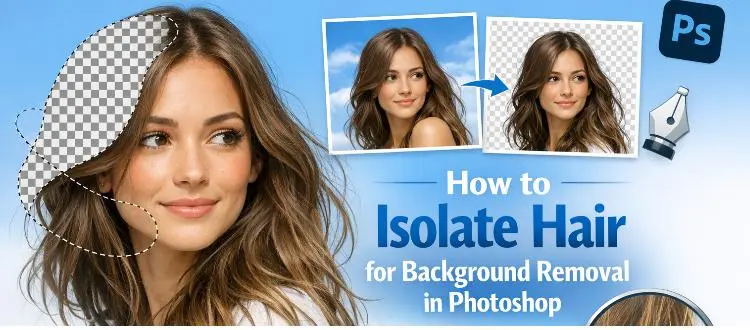
How to Isolate Hair for Background Removal in Photoshop
Are you tired of spending hours trying to perfectly isolate hair from a background in Photoshop, only to end up with messy, unnatural edges? You're not alone.
Clipping Path Associate has empowered businesses globally for over 12 years. A passionate team is dedicated to providing meticulous photo editing services. Expertise is offered in a range of areas, from precise clipping paths to flawless image retouching. The company offers straightforward yet impactful solutions tailored for photographers, e-commerce enterprises, advertising agencies, web design firms, magazine publishers, printing companies, and more.
We Accept : 